Time Tracking That Works

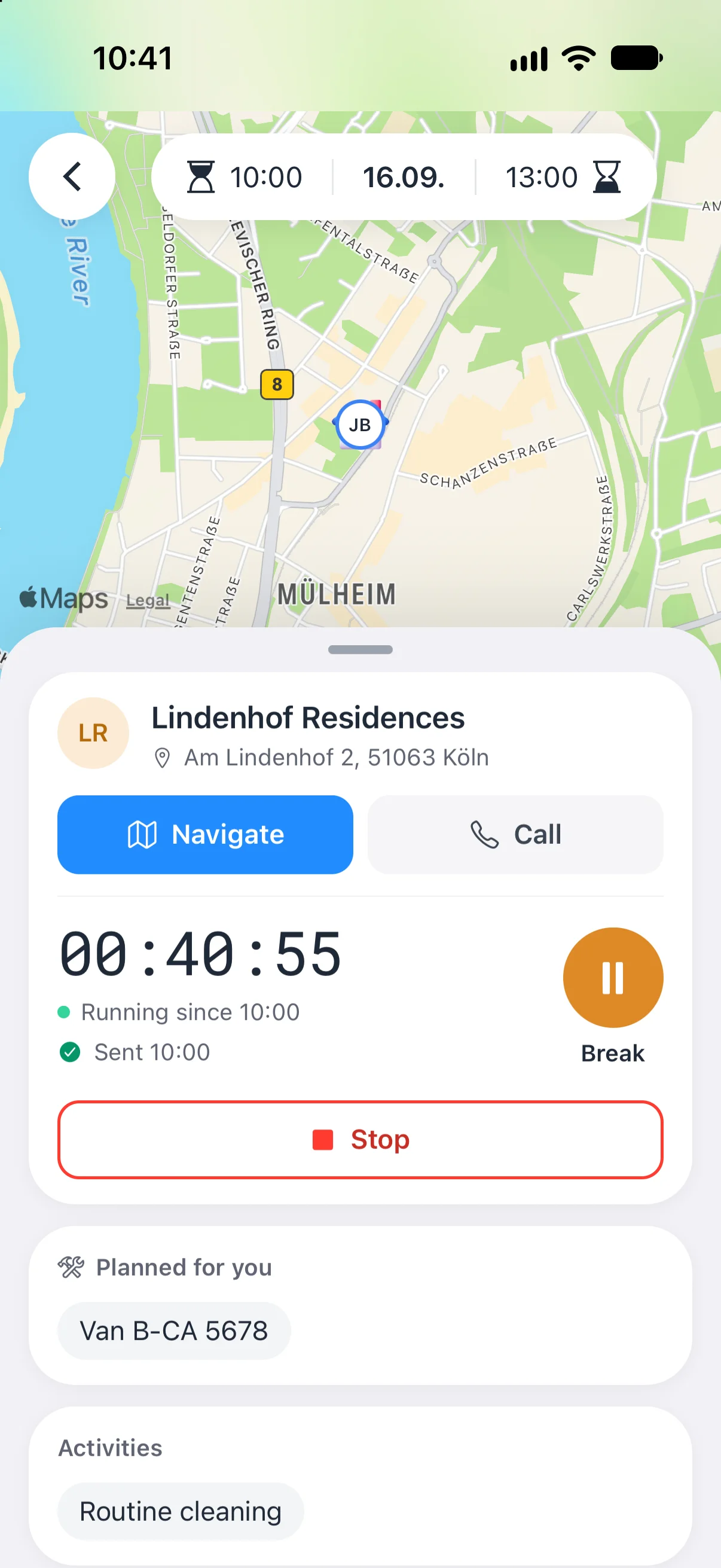
Your employees record working hours right at the job site: start, pause and stop on their smartphone, with GPS location and even without signal.

start & stop on site
GPS
iOS & Android
App
extra hardware
0€

from €69 net / month for up to 5 employeesNo credit card required

app.crew-active.de
Workload view in Crew Active: contract hours, planned and recorded hours and time balance per employee (sample data)

How does GPS time tracking work in Crew Active, and is it allowed?

When your employees tap start, pause or stop in the Crew Active app at the job site, by default the app saves one GPS point each time, as long as GPS is on and the phone has signal. In between and after work, time tracking records no location, so there is no continuous tracking and no tracking in the background. In the office you see, for each job, these points and how far start and stop were from the site's stored location, and you can turn this into a GPS proof PDF for your client.

In Germany this is generally allowed when the location serves a clear purpose, such as proving working time at the customer's site, and your employees are told beforehand.

General information, not legal advice. More: GPS Tracking Employees: What's Legal? and GDPR-Compliant Time Tracking.

Time Tracking Without Compromise

From clocking in at the job site to the report for payroll.

  • Event History

    Complete logging of all clock events. Transparent tracking for both parties.
  • Automatic Breaks

    If you want, Crew Active deducts breaks automatically: up to 30 minutes after more than 6 hours and up to 45 minutes after more than 9 hours of work. You switch it on or off for your company. When it is on, you can also switch on under Account > Features that Crew Active deducts at most 30 minutes even over 9 hours. For one employee you can set their own rule, for example up to 20 minutes after more than 5 hours.
  • Check start and stop at your company site

    Does your team start at the depot? Switch on under Account > Features that the app checks, at the first start of the day, at every stop or both, that the phone is within 200 m, 250 m, 500 m or 1 km of your company address. Further away, the app does not start, and at a stop the time keeps running. Your company address only: no geofencing at customer sites. The check runs in the app only: what it checks cannot be tapped in the browser, and your team needs the current app.
  • GDPR Compliant

    All data is stored in an EU data centre in compliance with GDPR.

One-Tap Clocking

Simple clock in/out with a single tap. No complicated operation needed.

Time account app: the balance in the office, and on the phone depending on your settings

Crew Active keeps a time account for each employee from target hours and recorded hours. You see the balance in the office, your team in the app depending on your settings.

  • Balance up to yesterdayIn the browser, each employee's time account shows the balance up to yesterday. The balance, the month row and the tiles each have a short explanation. Time worked today counts from tomorrow. You can print the account as a PDF.
  • Target, actual, vacation and sicknessThe account counts target hours per weekday, public holidays per German state, vacation, sickness and time off in lieu.
  • Carry-over from your old systemIf you switch to Crew Active, you enter the old balance as a carry-over in hours, with the day it applies from.
  • Hours in the appIn the app your employees see their hours and jobs for the month. They see their balance when they request time off in lieu, if target hours are set, and with fixed monthly hours.
  • Day view for employeesIf you want, your employees see per day in the app the start, end, break, actual, target and plus or minus, and how their balance follows from it. Switch it on under Account > Features.
  • Hide the balanceIf your employees should not see a balance, you hide the time account from them. Then they only see their hours. Switch it on under Account > Features.
  • Take over planned timesIf a team does not clock in, you take over the planned times of a month up to yesterday as recorded times in the browser, with undo for 24 hours. Times already recorded stay as they are. On request.
  • Fixed monthly hoursFor employees with fixed hours per month, the account and the workload count per month, and vacation counts at the average of the 13 weeks before. If you want, the time between two customers counts as travel, per day at most what you set for the number of customers. Your employees then see their balance in the app, as long as you do not hide the time account. On request.
Records on demand

Built for Your Working-Time Documentation

  • Since the 2022 Federal Labour Court ruling (1 ABR 22/21), employers in Germany have had to record their employees' working hours. Crew Active makes the recording easy and the records ready to show at any time.

    • Start, breaks and end of every shift recorded to the minute
    • Optional break deduction following the steps of section 4 ArbZG
    • Export for authorities and accountants
    • Office can add or correct hours
  • GDPR Compliant

    • Server location EU
    • Encrypted data transfer
    • DPA on request, at no extra cost
Try it

Clock a job

This is how your team clocks in the app. Tap Start, then Break or Stop.

North Office ComplexMusterallee 12, 50733 Köln
02:42:38Stopped at 10:14

The clock runs fast here: 1 second is 10 minutes.

The app saves one location point at start, pause and stop. GPS is on for new accounts, and you can switch it off for your team. There is no continuous tracking.

After Stop, you see here what the GPS location proof for your client shows.

GPS Location Proof

Finding

On October 30, 2026, an assignment was recorded by GPS from 7:02:14 AM to 10:14:52 AM (GMT+1).

Site
North Office ComplexMusterallee 12, 50733 Köln
Employee
Murat Y.
Duration
2h 43m

Measured points

#TimeToleranceDistance
Start7:02:14 AM±8 m24m
End10:14:52 AM±6 m19m

Recording quality: Good. Tolerance = accuracy reported by the device, distance = distance to the stored site location.

  • Job start
  • Job stop
  • Stored object location
  • Accuracy of the reading (radius)
  • Distance to the object (straight line)

Integrity notice

No irregularities detected.

Preview with sample data. You create the PDF in the browser, with the map and coordinates. See a real sample (PDF, in German)

Common questions about GPS time tracking

  • Does Crew Active track my employees all the time?

    No. For time tracking, the app saves one location point only when someone taps start, pause or stop, and by default only when GPS is on (as it is for new accounts) and the phone is online. Between clock events and outside working hours no location is recorded.
  • How do I prove that my cleaning staff were really at the site?

    With the GPS proof. For every finished job with GPS data the office creates a PDF with a map, the duration, and the time, coordinates and accuracy of the start and stop readings. When a location is stored for the site, the PDF shows the distance of start and stop to it, and marks it when start or stop was more than 200 metres away. The PDF backs these readings, not the time in between. You can hand it to your client, for example after a complaint.
  • Can employees check in at the work site with the app?

    Yes. The employee opens the job in the Crew Active app and taps start at the site and stop at the end. By default, the app saves the location each time when GPS is on and the phone is online. With GPS on and the phone online, the app does not start the job without location access but asks for it first. You need no time clock on site. The distance to the site never blocks the start: the office sees it, and a start or stop more than 200 metres from the site's stored location is marked.
  • Is GPS time tracking allowed under the GDPR?

    In general yes, when the location serves a clear purpose, such as proving working time and presence at the customer's site, nothing more is recorded than that purpose needs, and your employees are told beforehand. If you have a works council, it is best to settle GPS in a works agreement. For time tracking, Crew Active saves the location only at clock events, and you can switch GPS off for your team. General information, not legal advice. More in GPS Tracking Employees: What's Legal? and GDPR-Compliant Time Tracking.
  • What does the employer see with GPS time tracking, and what don't they see?

    For each job you see the start, pause and stop points on a map and in a list with time and accuracy, the distance of start and stop to the site's stored location, and whether a reading failed. You do not see where an employee is between clock events, on the way or after work, because time tracking records no location then. By default, without signal or with GPS switched off in Crew Active, the app saves no location even at clock events.

More questions? or talk to our team.Contact us

Try Scheduling & Time Tracking Free for 1 Month

Try Crew Active free for 1 month. No credit card required.

GDPR Compliant
Servers in the EU
Support in German, English and Italian

More

Resources
Account